TestoZa Blog · Product guide
Stop painting white boxes on your PDFs
Most free PDF editors hide your old words under a white rectangle and type the new ones in Arial. We built Panna to change the text inside the PDF instead, in the document’s own font, right in your browser. This guide walks through every tool, explains what happens inside the file, and compares Panna with the editors you already know.
By TestoZa Team · 26 September 2026 · 27 min read
Try the free PDF editor at pdf.testoza.com
Two ways to fix one date. A typical white-box editor covers the old “14” with a white rectangle and types “15” on top in Helvetica. Copy the text out of that file and you get “…held on 14 March 2026. 15”, because the old date is still inside it. Panna makes the same fix by rewriting the text itself, in the certificate’s own font, so the copied text reads “…held on 15 March 2026.”
It’s a quarter to eleven at night. Sixty certificates for the school science fair are sitting in one PDF, the Word file they came from is long gone, and you’ve just noticed the date. It says 14 March. The fair was on the 15th.
So you do what everyone does. You search for a free PDF editor, open the first result, click on the date and type a 5.
The new digit comes out in Arial, sitting a little higher than the serif text around it. The download button asks you to create an account, or wants a card number, or stamps a watermark across the certificate. And there’s a problem you can’t see at all. Many free editors never touched your date. They painted a white rectangle over the 14 and floated a 15 on top of it. Copy the text out of the “corrected” file and the old date is still in there.
Most of us have lived through some version of that evening. It’s the reason we built Panna.
Panna (पन्ना, Hindi for “page”, and also the word for emerald, which is why everything about it is green) is a free set of PDF tools from TestoZa, the online test maker for teachers. It lives at pdf.testoza.com. There’s no sign-up, no watermark and nothing to install, and your file never leaves your device, because all the work happens inside your browser.
The editor does the part that white-box editors skip. It reads the text that’s actually in the PDF, writes your change with the font embedded in the document, and takes the old words out of the file. That’s the difference in the demo above.
The rest of this guide goes through every tool, big and small, explains what happens inside the file when you press Download, and compares Panna with Smallpdf, iLovePDF, Sejda, Adobe Acrobat and PDF24. If you’d rather just try it, the editor is one click away.
Open the free PDF editorWorks in your browser. Nothing is uploaded.
Panna at a glance
If you’re deciding whether to read on, here’s the short version.
| What it is | A set of free PDF tools that run in your browser |
|---|---|
| Where | pdf.testoza.com |
| Price | Free |
| Account | Not needed |
| Watermark | None |
| Privacy | Files are processed on your device and never uploaded |
| Languages | English and Hindi (Devanagari) |
| Works on | Android, iPhone, Windows, Mac and Linux, in any modern browser |
| Made by | TestoZa Educational Systems, Chennai, India |
There are four tools today.
| Tool | Link | What it’s for |
|---|---|---|
| Edit PDF | pdf.testoza.com/edit-pdf | Change existing text in its own font, erase, add text, sign, highlight, draw, insert images and organise pages |
| Edit Hindi PDF | pdf.testoza.com/edit-hindi-pdf | The same editor, with a bilingual page and advice for Hindi documents |
| LaTeX to PDF | pdf.testoza.com/latex-to-pdf | Turn LaTeX documents, Markdown and maths into a clean, paged PDF |
| ChatGPT to PDF | pdf.testoza.com/chatgpt-to-pdf | Save answers from ChatGPT, Gemini, Claude and other AI chats as a PDF, maths included |
Merge, split, compress and PDF to Word are listed on the site as the next tools in line.
Editing text in the document’s own font
Open pdf.testoza.com/edit-pdf, drop a PDF on the page or tap Choose PDF, and the editor opens full screen.
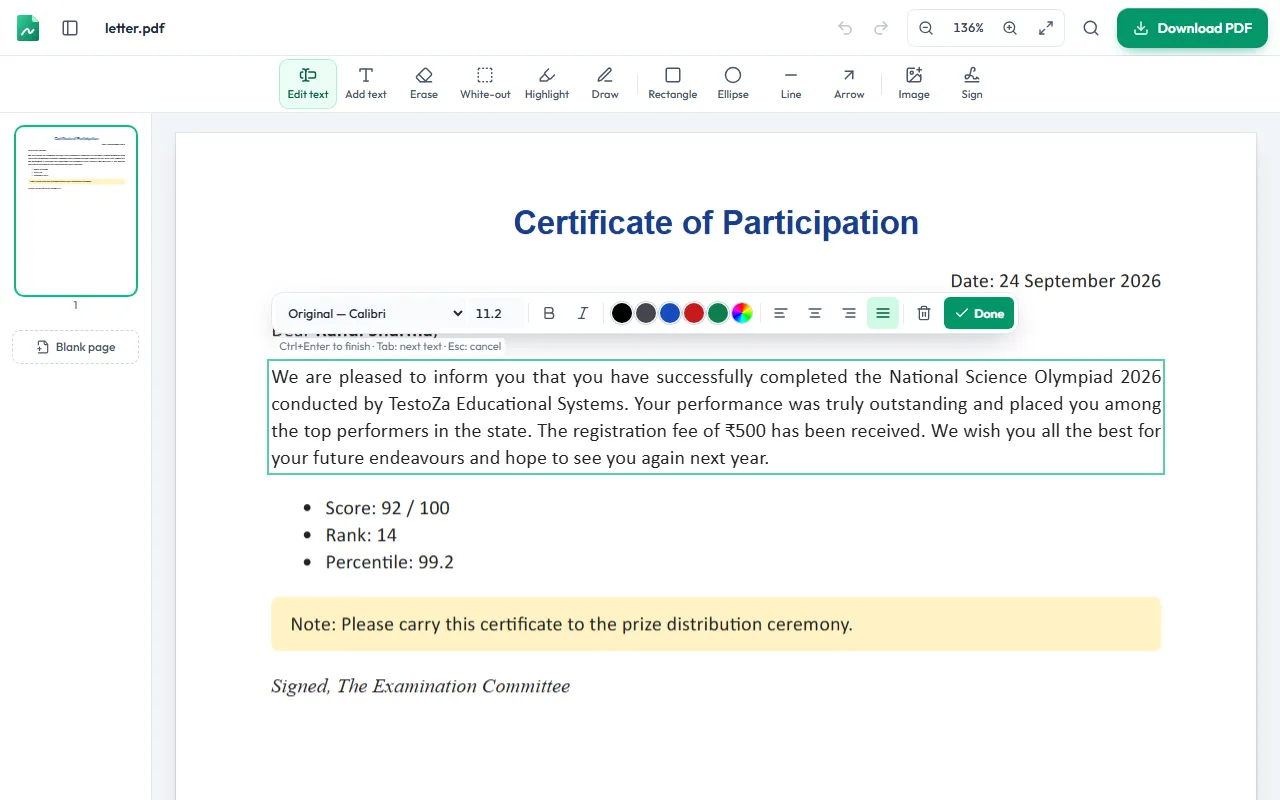
The file name sits at the top, and you can click it to rename your download. Next to it are undo and redo, zoom, find and replace, and a single green Download PDF button. Every tool in the toolbar has a label, so nothing is buried in a menu, and page thumbnails run down the left side.
Click, type, done
Click any line and a text box opens exactly on top of it, at the same size and position, in a matching font. Type your change. Press Enter to finish a single line, or Ctrl Enter for a paragraph, where Enter gives you a new line instead.
When you finish, Panna writes your words into the PDF using the font that’s already embedded in it. It doesn’t reach for something that looks similar. It uses the actual font.
Honest about missing letters
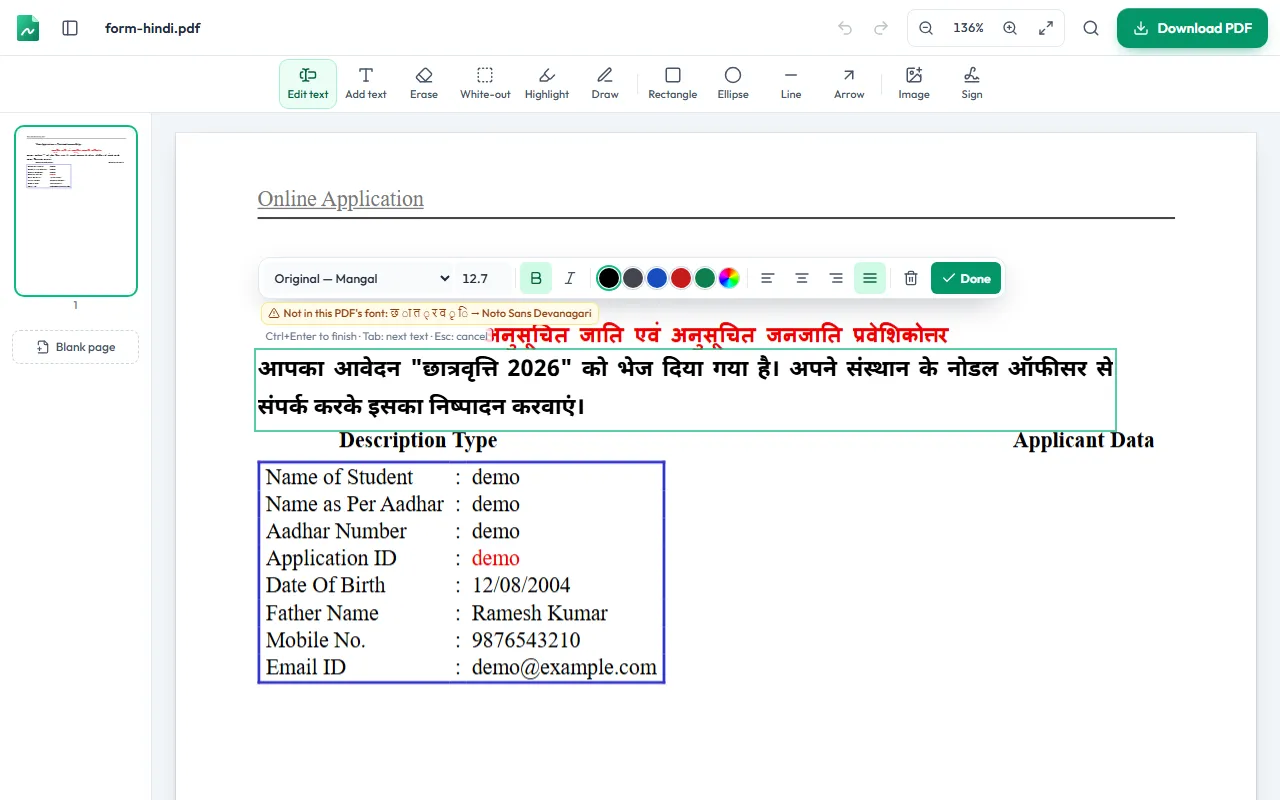
To keep files small, most PDFs only carry the letters they actually use. A certificate might hold a font with a few dozen characters in it and nothing more. Type a capital V into a document that never had one and Panna tells you while you’re still typing, with a note like “Not in this PDF’s font: V → Times”. It then draws only that V in the closest matching font and leaves everything else in the original. Most editors switch fonts quietly and leave you to spot it later.
Paragraphs that reflow, tables that stay put
Change a word in the middle of a paragraph and the lines rewrap inside the original width, starting from the line you changed. The lines above it are left exactly as they were, byte for byte, and justified text stays justified.
Tables get the same care. A common failure in online editors is treating a whole column of a form as one text box, so fixing one cell nudges all the others. Panna splits text wherever there’s a wide gap, which keeps “Name of Student”, the colon and “Rahul” as three separate pieces, and it only joins lines into a paragraph when there’s clear evidence that the text wraps.
Moving through a document quickly
Tab jumps to the next piece of text, even when it’s on the next page. Shift Tab goes back, and Esc cancels.
While a text box is open, a formatting bar sits above it. The font menu lists the original font first, then any other font already used in the PDF, then six standard families: Helvetica (Arial), Times New Roman, Courier, Noto Sans, Noto Serif and Noto Sans Devanagari. You also get size, bold and italic, five colour swatches plus a custom colour picker, left, centre, right and justified alignment, a button that restores the original text, and delete.
A few font types can’t be re-encoded at all, Type3 fonts being the usual example. Panna tells you so up front, then erases the old text and types yours in a similar font.
Moving text with smart guides
This is one of our newer additions, and it borrows an idea from design software. Drag any line or paragraph and rose-coloured guides appear. The text snaps to the edges, centres and baselines of other text on the page, to images and shapes you’ve added, to the centre of the page, to the centre of the table cell it’s sitting in (Panna finds cells from the page’s own ruling lines), and back to where it started, which shows up as a dashed line. A small read-out tells you how far you’ve moved it, in millimetres.
Hold Shift to keep the move perfectly straight, hold Alt to turn snapping off, and press Esc to cancel. The arrow keys nudge the selected text, image or shape by one point, or by ten with Shift held down. A floating bar offers the same nudges as buttons, along with Edit text and Back to original position.
Each open text box also has a handle on either side for changing the width the text wraps to. Make it wider to fit more words on a line, or narrower so a long entry wraps neatly inside its table column. The box keeps the edge the text was aligned to, so a right-aligned amount grows to the left, the way it should. And when you move text without changing it, every original character is redrawn at its old position plus the offset, with the same line breaks and spacing.
Edit a PDF nowFree, no sign-up, and the file stays on your device.
Every other tool in the editor
Changing existing text is the headline feature, but most jobs need a little more than that. Here’s the rest of the toolbar, roughly in the order it appears.
Add text T
Click anywhere to place a new text box, pick a font, size and colour, and drag its handle if you want the text to wrap. It works in English, Hindi or both.
Erase E
Drag a box over the words you want gone. They’re removed from the page’s content itself, and whatever was behind them, whether lines, colours or images, stays where it was.
When you download, a clean-up pass also deletes every object the file no longer uses, so the erased words can’t be copied, searched or lifted out from under a box. There’s no box to lift. Erased areas stay selectable in the editor (hover to see a dashed outline), so you can delete an erase to bring the text back, or switch on White-out for that area to paint over images and lines as well.
White-out W
White-out covers an area with the page’s own background colour. Panna samples the colour from the page, so it blends into cream, grey or tinted paper, not only white. Any text underneath a white-out is removed for real too. It’s mainly meant for scanned pages and pictures, which don’t have a text layer: cover the old words, then type on top with Add text.
Highlight H
Drag across a sentence and the highlight snaps to the actual lines of text, then blends in the way a real marker does, so the words stay sharp. Yellow, green, blue and pink are one click away, and any other colour is available from the picker.
Draw D
Freehand ink with a little smoothing applied as you draw. There are four ink colours plus a custom one, and the width slider shows a live preview of how thick the stroke will look at your current zoom.
Shapes
Rectangle, ellipse, line and arrow. Drag to draw, pick a stroke colour and width, tick Filled for rectangles and ellipses, and change the opacity once they’re placed.
Image
Insert a photo, logo or stamp in PNG, JPEG, WebP or GIF. It lands in the middle of the page you’re looking at, and you can move it, resize it, rotate it in 90-degree steps and change its opacity. Big photos are scaled down to 2,400 pixels on the longest side, so the finished PDF stays light.
Sign
The signature dialog gives you three options. You can draw with a finger, stylus or mouse. You can type your name and pick one of four handwriting styles: Dancing Script, Great Vibes, Caveat or Sacramento. Or you can upload a photo of your signature on white paper, and Panna removes the paper background for you.
Ink comes in black, blue or green. Your last four signatures are remembered on your device only, ready for one-click reuse, and you can remove any of them.
Find and replace Ctrl F
Search every page at once, with options for matching case and whole words, then replace one match or all of them. Replacements are ordinary text edits, so they keep the PDF’s own font and formatting, and a bold name stays bold. If some matches sit in text that can’t be edited, Panna tells you how many it skipped rather than failing quietly. It’s the quickest way to fix a name, a date, a class or a roll number across a whole document.
Pages
The thumbnail panel lets you drag pages into a new order (or use Move up and Move down), rotate them left or right, duplicate a page, insert a blank page that automatically matches the size of the page next to it, or delete one. Pages you’ve changed get a small green dot, and every page action can be undone.
The everyday comforts
Undo and redo go back up to 100 steps. Zoom runs from 25% to 500%, fits the page width by default and responds to Ctrl plus the mouse wheel.
About a second after every change, your work is saved in your browser. Close the tab by accident and a Continue editing card will be waiting for you with the file name, the number of changes and when you last worked on it. Files over 60 MB aren’t autosaved, to stay within phone storage limits. If you try to leave with unsaved changes, the browser warns you first.
Downloading is one click, or Ctrl S, with no export wizard, sign-up wall or watermark. On a phone, the toolbar scrolls sideways and a page counter floats at the bottom of the screen.
Keyboard shortcuts
| Shortcut | What it does |
|---|---|
| V T E W H D | Edit text, Add text, Erase, White-out, Highlight, Draw |
| Ctrl S | Download |
| Ctrl F | Find and replace |
| Ctrl Z / Ctrl Y | Undo / redo (Ctrl Shift Z also redoes) |
| Ctrl + / Ctrl − / Ctrl 0 | Zoom in, zoom out, fit to width |
| Tab / Shift Tab | Next or previous text, while editing |
| Enter / Ctrl Enter | Finish a line, finish a paragraph |
| ← ↑ ↓ → | Nudge the selection by 1 pt (10 pt with Shift) |
| Shift / Alt while dragging | Move in a straight line, move without snapping |
| Delete | Delete the selected object |
| Esc | Cancel, deselect, or cancel a drag |
On a Mac, use ⌘ wherever it says Ctrl.
Twelve small details
Good tools are mostly small decisions. Here are a dozen you might never notice, and would probably miss.
- White-out matches the paper. It samples the page’s colour, so it disappears into cream certificates and grey forms, not just white paper.
- Highlights follow the lines. They look like a careful marker stroke rather than a rectangle dropped on the page.
- A preview for stroke width. The slider shows the line exactly as thick as it will appear on the page at your zoom.
- Blank pages fit in. A new blank page takes the size of the page beside it, so the document stays uniform.
- Green dots on edited pages. The thumbnails show at a glance where you’ve made changes.
- Clean signature uploads. A photographed signature loses its paper background automatically, no photo app needed.
- Replace keeps formatting. A bold name stays bold after find and replace.
- A way back. One button returns a moved line exactly where it started.
- A toolbar that moves aside. When your text is near the bottom of the screen, the selection bar jumps to the top so it never covers the rows you’re lining up with.
- Passwords are never saved. Even autosave asks for the password again next time.
- Money isn’t maths. In the maths converter, “$5 and $10” stays as money instead of turning into a formula.
- File names from titles. “Worksheet 3: Limits and Continuity” downloads as
Worksheet-3-Limits-and-Continuity.pdf, and Hindi titles keep their Hindi letters.
Hindi PDFs, done properly
pdf.testoza.com/edit-hindi-pdf is the same editor with a bilingual page and advice for people editing Hindi documents such as application forms, certificates, circulars and question papers.
Why Hindi breaks in most editors
Hindi isn’t written one letter after another in a straight line. These four examples show what an editor has to get right.
Set in Noto Sans Devanagari, the font Panna uses for new Hindi text.
Putting all of that in the right place is called text shaping. Editors that skip it produce matras in the wrong spot, broken conjuncts, or Hindi that can no longer be searched or copied.
What Panna does differently
Panna shapes every Hindi word using the OpenType rules of Noto Sans Devanagari, an open-source Unicode font designed for the Devanagari script. It also stores the real Hindi text alongside the shapes it draws, so the page looks right, and search, copy-paste and screen readers still get proper Hindi.
One detail is worth knowing. New Hindi text is always set in Noto Sans Devanagari, because the Hindi fonts embedded inside PDFs usually can’t be reshaped for new words. Rather than break your matras, Panna uses Noto and tells you with a note while you type. Syllables you don’t change keep their original shapes, and Hindi and English can share the same page without any trouble.
Which Hindi PDFs can you edit?
| Type of Hindi PDF | What to do | Why |
|---|---|---|
| Unicode Hindi (Mangal, Nirmala UI, Noto, Kokila; PDFs from Word, Google Docs or Chrome) | Edit in place | The text is stored as real Hindi letters, so Panna can change it and keep it searchable. |
| Old non-Unicode fonts (Kruti Dev, DevLys, Chanakya) | Erase and retype | These fonts store Hindi as English letters, so the text looks jumbled when edited. Erase the line and retype it with Add text, and it’s saved as proper Unicode Hindi. |
| Scanned documents and photos | White-out and type | A scan is a picture with no text layer. |
Typing in Hindi
On an Android phone or an iPhone, add Hindi to Gboard or the iOS keyboard and type phonetically, so “namaste” becomes नमस्ते. On Windows, add Hindi under Settings → Time & language → Language & region, then switch keyboards with Win Space. Or write the text in Google Docs or WhatsApp, copy it, and paste it into the PDF.
Edit a Hindi PDFहिंदी PDF एडिट करें, free, with nothing uploaded.
ChatGPT, Gemini and LaTeX maths, as a clean PDF
Ask ChatGPT to explain the quadratic formula and the answer looks lovely on screen. Keeping it is another matter.
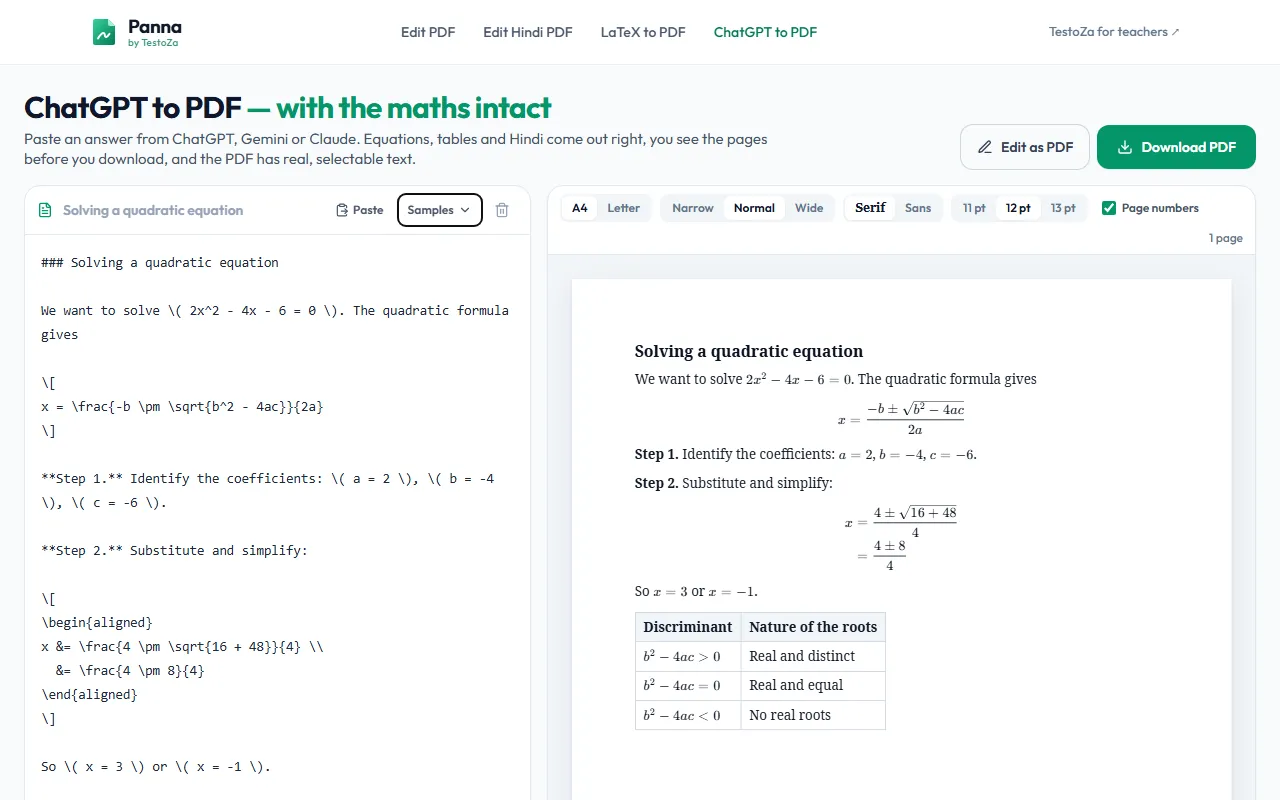
Copy it and you get code like \frac{-b \pm \sqrt{b^2-4ac}}{2a}. Print the chat and formulas can be sliced in half at page breaks while the layout falls apart. Select the answer with your mouse and paste it somewhere else, and every formula shows up several times over, as gibberish like “x2x^2”.
pdf.testoza.com/latex-to-pdf and pdf.testoza.com/chatgpt-to-pdf solve this. They share one engine, and the two pages are simply written for different readers: one for people who work in LaTeX, and one for anyone saving AI answers.
What it understands
It reads ChatGPT’s \( … \) and \[ … \] notation, including aligned equations and tables with maths in them. It reads Gemini’s $ … $ and $$ … $$, even in the middle of a sentence. It handles Claude’s answers and ordinary Markdown: headings, bold and italic, lists, tables, code blocks, links, task lists and block quotes.
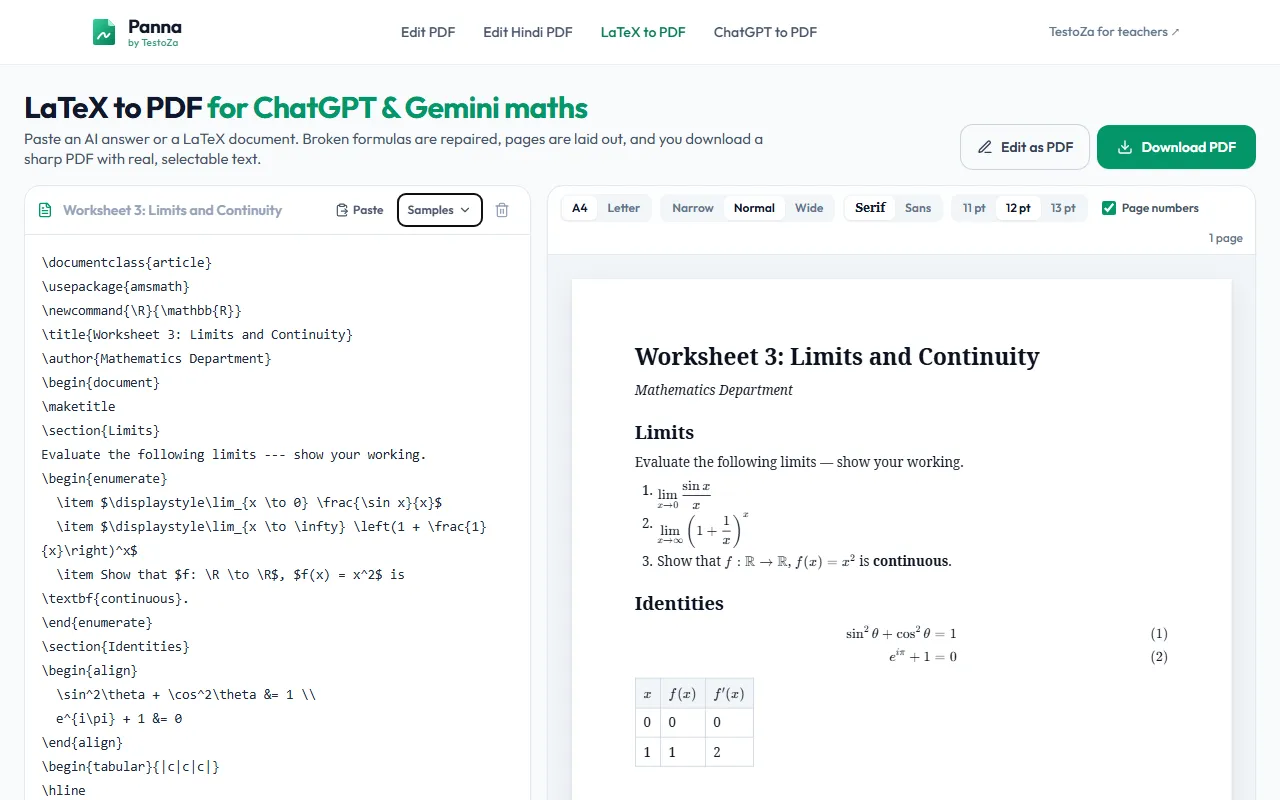
Whole LaTeX documents work too. That covers \documentclass and the preamble; \title, \author, \date and \maketitle; sections down to \paragraph; itemize, enumerate and description lists; tabular with \multicolumn; quote and center; \textbf, \textit, \emph, \texttt and \underline; \url, \href and \footnote; and numbered environments such as equation and align, with their equation numbers.
Simple macros defined with \newcommand, \renewcommand, \def or \DeclareMathOperator are picked up. Chemistry written as \ce{…} (mhchem) is typeset even without dollar signs. Hindi works as well, including Hindi inside a formula such as \text{आधार}. And \newpage, \pagebreak or \clearpage start a new page.
What it fixes for you
Copying damages maths in predictable ways, so Panna repairs the usual problems and shows each repair as a small “Fixed” chip under the text box.
- Lost backslashes are put back, so
[ … ]becomes\[ … \]again and( x^2 )becomes\( x^2 \). - Doubled backslashes from JSON, such as
\\frac, are halved. - Bare LaTeX, like a line reading
\frac{a}{b} = cor “where \alpha is…” in the middle of a sentence, is wrapped as maths. - LaTeX inside a
```latexcode block is unwrapped and typeset. - A lone dollar sign, as in “costs $5 and $10”, is left alone as money.
- Garbled selection copies are rebuilt. When you select an answer in ChatGPT, Gemini, Claude or even Wikipedia, your clipboard also carries a richer version of the page. Panna reads that, recovers the original TeX for every formula, and rebuilds clean Markdown. It understands KaTeX, MathJax and Wikipedia’s maths, and it can convert MathML from MathJax 3 or Microsoft Word back into TeX.
- Formulas that really are broken are counted, and a notice such as “2 formulas have errors — show” takes you straight to the first one.
Pages you can check before you download
You choose A4 or Letter; narrow (12.7 mm), normal (20 mm) or wide (25.4 mm) margins; a serif or sans font; 11, 12 or 13 pt text; and whether to print page numbers, which appear as “1 / 4”. The preview shows real pages at true width, with dashed “Page N” markers exactly where the PDF will break, plus a page count. Formulas and tables that are too wide are shrunk to fit the page, down to half size at most, instead of running off the edge. The title box starts with your first heading and becomes the PDF’s title and file name.
What you get
Download PDF (or Ctrl S) produces a real vector PDF, usually in about a second. It isn’t a screenshot, and there’s no print dialog. The text is selectable and searchable in the same fonts as the preview, it stays sharp at any zoom, equation numbers and clickable links survive, headings become bookmarks, and the document’s language is set to Hindi or English so screen readers and search engines read it correctly. Even emoji make it through, drawn as crisp images.
If the document needs a logo, a signature or a last-minute fix, Edit as PDF generates it and opens it straight in the Panna editor.
Six samples are built in if you want to see what it can do: a ChatGPT answer, a Gemini answer, a copy with broken maths, a LaTeX document, a Hindi worksheet and a chemistry sheet. There’s a Paste button that reads rich clipboard content where the browser allows it, a Clear button you can undo, and your draft and settings are saved on your device. On phones the page switches to Write and Pages tabs, with a Download bar that stays in reach.
To save a whole ChatGPT conversation, paste the answers one below another, add a heading above each, and type \newpage on its own line wherever you want a new page to begin.
When to use something else
For a thesis with TikZ figures, a bibliography and custom packages, a full LaTeX system is still the right choice, whether that’s Overleaf (which needs a free account) or TeX installed on your computer. Panna is for the everyday case: an AI answer, a worksheet, a problem set, a page of notes. Paste it, check the pages, download.
Turn a ChatGPT answer into a PDFOr paste a LaTeX document at pdf.testoza.com/latex-to-pdf.
What happens when you press Download
Why can Panna do things that white-box editors can’t? Because it doesn’t treat your PDF as a picture.
A PDF page is a list of drawing instructions. A line of text on a certificate looks roughly like this inside the file:
BT                                 % start a block of text
/F1 11 Tf                          % font F1 (embedded in the file), 11 pt
72 700 Td                          % move to this point on the page
(Certificate of Participation) Tj  % draw these characters
ET                                 % end the block
Panna has its own PDF engine, built on open-source foundations (Mozilla’s pdf.js, pdf-lib and fontkit), and it reads and rewrites these instructions directly, in your browser. It works in seven steps.
- Read. It runs the page the way a PDF viewer does and records every character: its position, font, size, colour and angle.
- Understand the layout. Characters are grouped into lines and blocks. Wide gaps split lines, which keeps table cells apart, and lines only become a paragraph when there’s evidence the text wraps. Each block’s alignment is detected as well.
- Decode the fonts. It builds a map from letters back to each font’s internal codes and notes exactly which characters each font subset contains. That’s how it knows your V is missing.
- Compare. When you edit, it compares the old and new text with the Myers diff algorithm, the same family of algorithm that powers
git diff. - Plan. Unchanged characters are redrawn from their original glyph codes, so they come out pixel-identical. New characters use the original font wherever it has them, and missing ones fall back to a standard font of the same style, then Noto Serif or Sans, then Noto Sans. Paragraphs reflow from the first changed line.
- Rewrite only what changed. Removed characters are replaced by an equal amount of spacing, so nothing else on the line moves. Anything shared between pages, such as a letterhead drawn on every page, is copied first, so an edit on page 3 doesn’t leak onto page 7.
- Clean up. Before saving, a mark-and-sweep clean-up deletes every object the document no longer uses: old text, replaced fonts, unused images. This step is what makes erasing real. The file is then saved with compressed object streams to keep it small.
The preview you see while editing isn’t a simulation either. Each edited page is rebuilt as a real one-page PDF by the same code that produces your download, and then drawn on screen. If it looks right in the editor, it’s right in the file.
Security and speed
Password-protected PDFs are opened by Panna’s own implementation of the PDF standard security handler. It covers revisions 2 to 6 (RC4, AES-128 and AES-256) and was checked against the official FIPS and RFC test vectors. Pages are drawn by pdf.js, the engine behind Firefox’s built-in PDF viewer, set up so that it never evaluates code from the file. We also chose a pdf.js build that supports older Android phones, because plenty of people still use them.
The heavy parts load only when they’re needed. The PDF engine downloads when you open a file, fonts download only when a character needs them, and only the pages near your screen are drawn.
Why your file never leaves your device
Think about the documents people edit: marksheets, certificates, ID proofs, offer letters, bank forms, medical reports. With most online editors, step one is uploading that file to someone else’s server. Deleting it an hour later is better than keeping it. Never receiving it is better still.
With Panna, your PDF is opened, edited and saved on your own device. If it has a password, the password is used only in your browser and is never stored. Signatures are remembered only on your device, and you can remove them whenever you like. Autosaved work lives only in your browser, and Discard deletes it.
To be fully transparent about what we do see: like almost every website, pdf.testoza.com counts visits and downloads with our own first-party analytics. A download is logged with the tool’s name and the page count, nothing more, and browsers that send the Global Privacy Control signal aren’t counted at all. We never receive your document or anything in it.
Free, and no catch
There’s no account, no watermark, no trial that runs out and, as things stand, no daily limit. Because your device does the processing, there’s no per-file server bill for us to pass on. After a download we do make one suggestion: if you’re a teacher, you can turn a PDF of questions into an online test on TestoZa. That’s the whole catch.
How Panna compares
Start with what most free editors actually do to your file, and the difference is easy to see.
| What happens to your document | Panna | Typical online editor |
|---|---|---|
| Edited text uses the PDF’s own font | Yes | Often retyped in Arial or Helvetica |
| Erased text is deleted from the file | Yes | Often covered with a white box |
| Table cells edit independently | Yes | Often one box per column |
| Hindi shaped correctly | Yes | Matras often break |
| Find and replace across pages | Yes | Not always available |
| Download without an account | Yes | Sign-up or paywall is common |
| File stays on your device | Yes | Uploaded to a server |
| Watermark on free downloads | None | Common |
Panna and the tools you already know
We took these details from each company’s own website in September 2026. Plans change often, so check before you rely on them. Sources are listed at the end of the article.
| Question | Panna | Smallpdf | iLovePDF | Sejda (web) | Adobe Acrobat (online) | PDF24 (online) |
|---|---|---|---|---|---|---|
| Edit existing text | Yes, in the PDF’s own embedded font | Pro plan (7-day free trial) | Yes | Yes | Paid plan (Acrobat Pro) | No, it adds new content on top |
| Free usage | Free, with no task quota | 2 tasks per day | Limited free tasks, then Premium | 3 tasks per hour, up to 200 pages or 50 MB | Free annotation tools; sign in to download | Free, no limits |
| Where your file goes | Stays in your browser | Uploaded, deleted after 1 hour | Uploaded, deleted after 2 hours | Uploaded, deleted after 2 hours | Processed in Adobe’s cloud | Uploaded, removed after a short time |
Where Panna stands out
- Same-font edits, with honesty. Panna writes with the document’s own embedded font and tells you exactly which characters, if any, had to come from another font.
- Nothing to upload. For sensitive documents, a service that never receives the file is the safest kind.
- Real erasure for everyone. Deleted text is gone from the file. Elsewhere, true removal usually sits behind a separate “redact” feature.
- Hindi. Many editors still struggle with Devanagari. Panna gets matras and conjuncts right and keeps the text searchable.
- Built for AI maths. The converter understands how ChatGPT, Gemini and Claude write formulas, and repairs what copying breaks.
Where others are ahead, for now
- Range of tools. Smallpdf, iLovePDF, Sejda and PDF24 offer dozens: merge, split, compress, and conversions to and from Word, Excel and images. Panna has four today, with merge, split, compress and PDF to Word announced as next.
- Scanned documents. Several competitors offer OCR, sometimes on paid plans. Panna doesn’t have OCR yet.
- Cloud workflows. Storage, team sharing and e-signature requests are strengths of platforms such as Adobe and Smallpdf.
- Very heavy files on low-end phones. Server-based tools don’t depend on the power of your device. Panna does.
For maths: Panna, Overleaf, or printing the chat?
| Question | Panna | Overleaf | Printing the chat page |
|---|---|---|---|
| Account needed | No | Yes (a free account works) | No |
| Takes AI answers as they are | Yes, and repairs them | Needs a proper LaTeX document | Yes |
| Full LaTeX packages (TikZ, bibliographies) | No | Yes | Not applicable |
| Page breaks | Previewed before download | Handled by LaTeX | Formulas can be cut in half |
| Best for | Worksheets, notes, AI answers | Theses, papers, large projects | Quick personal copies |
Who it’s for
Teachers and schools
Fix a date across sixty certificates at once with find and replace. Correct a typo in a circular or a question paper without changing its font. Add the school logo and the principal’s signature. Turn ChatGPT or Gemini explanations into printable worksheets, then use Edit as PDF to brand them.
Students
Fix mistakes in your own resume or project report, sign and submit forms, keep AI-explained solutions as clean PDFs for revision, and write LaTeX assignments without installing anything.
Job seekers and applicants
Fill in details, add a photo, sign, and highlight what matters, without handing your documents to a server.
Offices and small businesses
Update a price in a quotation, correct an address on an invoice, add a stamp and signature, reorder pages, or insert a blank page for notes.
Hindi-medium users
Edit Unicode Hindi forms and documents with correct matras, and retype old Kruti Dev text as proper Unicode.
Anyone who values privacy
If a document holds your ID number, your marks, your salary or your health records, it shouldn’t have to leave your phone just so you can fix one line.
Quick how-to guides
Edit text in a PDF in the same font
- Go to pdf.testoza.com/edit-pdf and drop your PDF on the page.
- Check that Edit text (V) is selected, then click the line you want to change.
- Type your change. If a note mentions characters that aren’t in the PDF’s font, those characters will use the closest match.
- Press Enter (Ctrl Enter for a paragraph), or Tab to move to the next text.
- Press Download PDF or Ctrl S.
Remove text from a PDF permanently
- Open the PDF and choose Erase (E).
- Drag a box over the words you want gone.
- Download. The words are deleted from the file and the background stays.
On a scanned page, use White-out (W) to cover the area instead, and read the note on scans under What Panna can’t do yet.
Sign a PDF
- Open the PDF and tap Sign.
- Draw, type or upload your signature, and pick an ink colour.
- Drag the signature into place and resize it.
- Download.
Edit a Hindi PDF
- Go to pdf.testoza.com/edit-hindi-pdf and open your file.
- Click the Hindi line and type with Gboard or the Windows Hindi keyboard, or paste Hindi text.
- Download. Matras and conjuncts are shaped correctly and the text stays searchable.
Save a ChatGPT answer as a PDF
- In ChatGPT, Gemini or Claude, click the copy button under the answer. Selecting the answer and copying it works too.
- Go to pdf.testoza.com/chatgpt-to-pdf and paste.
- Check the pages on the right and pick the paper size, margins, font and text size.
- Press Download PDF.
Convert a LaTeX document to PDF
- Go to pdf.testoza.com/latex-to-pdf.
- Paste your document, from
\documentclassto\end{document}. - Look over the “Fixed” chips and any formula errors, then check the page breaks in the preview.
- Press Download PDF, or Edit as PDF to add a logo or signature first.
What Panna can’t do yet
No tool does everything, and knowing where the edges are saves time. This is where Panna stands today.
In the PDF editor
- No OCR yet. Scanned PDFs are pictures without a text layer, so use White-out and Add text.
- White-out on a scan only covers it. On pages with real text, erased and whited-out words are deleted from the file. On a scanned page, White-out paints over the picture while the original image stays inside the file, so it isn’t a substitute for proper redaction of sensitive scans.
- Old Hindi fonts such as Kruti Dev, DevLys and Chanakya can’t be edited in place. Erase and retype instead.
- Some text can’t be edited in place: vertical text, Type3 fonts and some East Asian fonts. Panna falls back to erasing and retyping where it can, and vertical text can’t be moved.
- No automatic hyphenation when paragraphs reflow.
- Superscripts and subscripts become separate small blocks.
- Page thumbnails show the original pages, not your edits.
- No form-filling mode for interactive PDF forms. Use Add text and Sign instead.
- Your device does the work. A 200-page, 50 MB PDF on a budget phone can be slow, and autosave lives in one browser rather than in a cloud account.
In LaTeX and ChatGPT to PDF
- No drawing packages such as TikZ or pgfplots, and only simple
\newcommand-style macros. - Copying a formula out of the PDF gives text in visual order, so a fraction’s denominator may come first, even though the formula looks perfect.
- Images from other websites are skipped if that site blocks cross-site access.
- MathML-only pages are converted on a best-effort basis.
Frequently asked questions
Is Panna really free? What’s the catch?
Yes, it’s free. There’s no account, no watermark and no subscription. Because the processing happens on your own device, there’s no per-file server cost for us to recover. TestoZa’s business is its assessment platform for teachers and students, and after a download Panna offers teachers a link to turn a PDF into an online test. That’s all.
Is my PDF uploaded anywhere?
No. It’s opened, edited and saved inside your browser, on your own device.
Will the edited text match the original font?
Yes. Panna writes with the font embedded in the PDF. If you type a character that isn’t in that font’s subset, it tells you and draws just that character in the closest match.
Can I change existing text, not just add new text?
Yes, that’s the core of the editor. Click any line or paragraph and edit it in place, and the result is real, searchable text.
Can I edit a scanned PDF?
Not the text itself, because a scan is a picture. Use White-out to cover the old words and Add text to type new ones. OCR isn’t available yet.
Can I open a password-protected PDF?
Yes, if you know the password. It’s used only in your browser and never stored, and the downloaded copy opens without it. Please only open and edit documents you’re authorised to change.
Does it work on my phone?
Yes, in Chrome, Safari, Edge and Firefox on Android phones, iPhones, tablets and computers. Very large PDFs open faster on a laptop.
What if I close the tab by mistake?
Your work is autosaved in your browser. Open the editor again and choose Continue editing.
Can I edit a PDF typed in Kruti Dev?
Kruti Dev stores Hindi as English letters, so edited text would come out jumbled. Erase the line and retype it with Add text, and it’s saved as proper Unicode Hindi.
Will anyone be able to tell the PDF was edited?
On the page, a Panna edit blends in. Like most PDF software, though, Panna records itself in the file’s Producer field and updates the modification date, which is standard and honest practice. Use it on documents you’re entitled to change.
Can I merge, split or compress PDFs?
Not yet. The site lists merge, split, compress and PDF to Word as the next tools in line.
Is the text in a LaTeX or ChatGPT PDF selectable?
Yes. It’s a real vector PDF with searchable text, clickable links and bookmarks.
Try Panna
For years, “free online PDF editor” has meant putting up with a white box, a mismatched font and a watermark, and sending a private file to a stranger’s server along the way. Panna is our attempt to end that. It edits the text inside the PDF in the document’s own font, deletes what you erase, handles Hindi the way Hindi is actually written, turns messy AI maths into clean pages, and does all of it on your device, for free.
It isn’t the biggest PDF toolbox around yet. There’s no OCR, and merge, split, compress and convert are still to come. But if the job in front of you is “fix this PDF properly, right now”, we think you’ll like it.
Panna is made by TestoZa, a free online test maker for teachers, schools and coaching institutes. If you teach from PDFs, you can also turn a PDF into an online test with automatic grading.
Use it responsibly. Please use Panna on documents you own or have permission to change. Altering certificates, marksheets or IDs issued by someone else to misrepresent facts is fraud.
Sources for the comparison
- Smallpdf: pricing, free vs Pro, file safety
- iLovePDF: editing existing text, FAQ
- Sejda: PDF editor, help
- Adobe: Acrobat online PDF editor
- PDF24: Edit PDF, editing text (help centre)
- Overleaf: plan limits